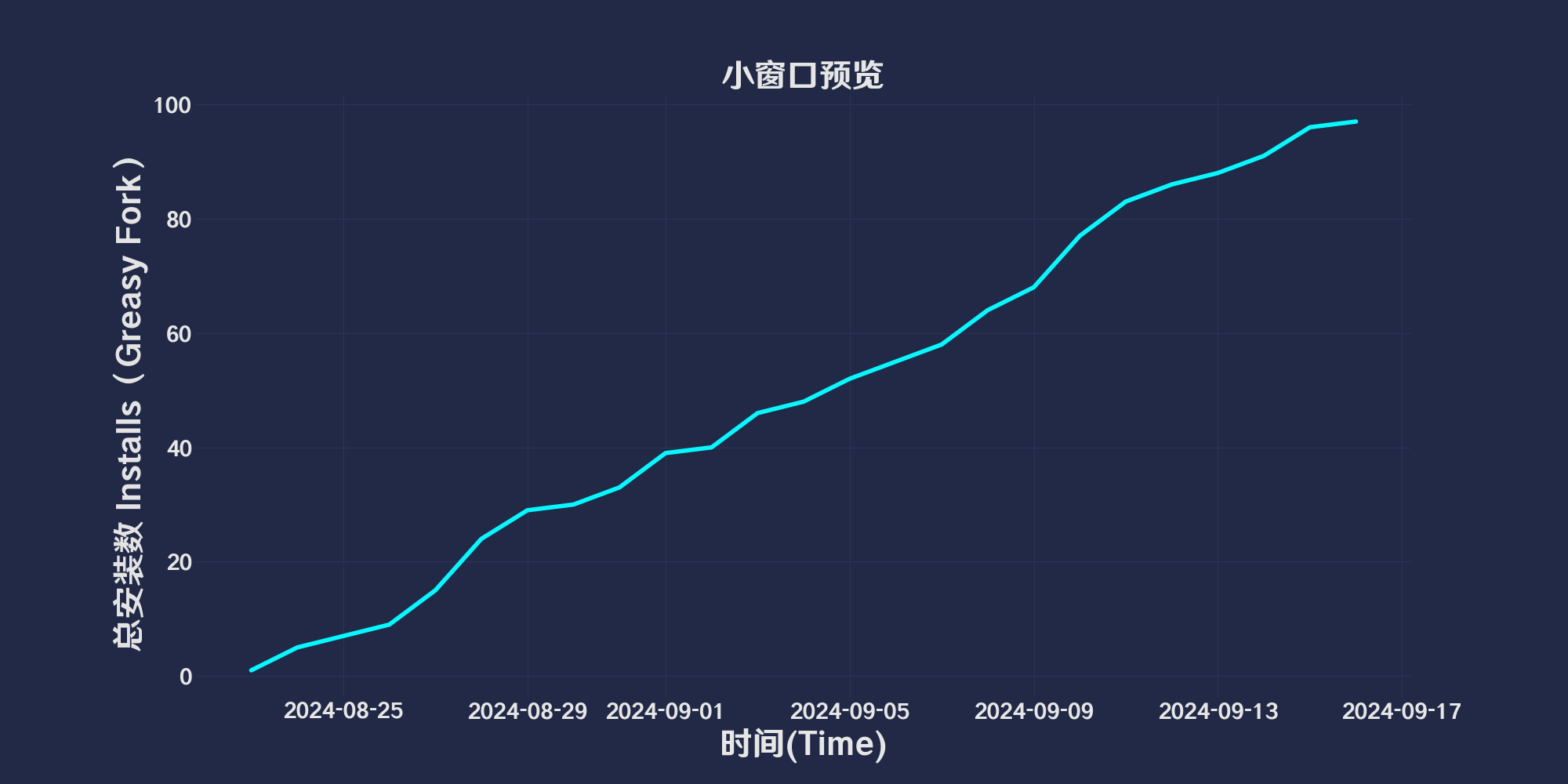
Otevřít odkaz ve vyskakovacím okně při přetahování odkazu,a před otevřením poskytněte náhled,použití Edge technologie předběžného čtení。Zároveň přidejte akrylový efekt za malé okno při jeho otevření.。
Verze ze dne

「 Open link in popup window when dragging link,and provide a preview before opening,use Edge pre-reading technology。At the same time, add an acrylic effect behind the small window when it is opened.。 」

Download:Github | ⭐Greasy Fork
repair: The problem of not being able to read the size and position of the pop-up window across sources。
New: When the pop-up window location cannot be read across sources,Will send information to the pop-up window,Allow pop-ups to set their own size and position。
grateful: tony0809 code contributions。
New:
• turn on Record window position hour,Automatically record current domain name configuration。
• Find window configuration logic:Domain name configuration → Custom window configuration → Script comes with configuration。
• No manual editing required for configuration,The script automatically updates the domain configuration when you change the window size.Every time you change the window size it will be recorded in the global custom configuration
• Configuration rules reference#529654
• Please refer to the video below for a demonstration of the new features.。
repair: #527837 event error,Modified to check mouse y axis < 1 Determine if the move is on a browser tab。
New: #527625
• Pressing the keyboard in long-press mouse mode does not trigger the preview window。
• When dragging a link to a new label in drag mode, the preview window will not be triggered.。
New: Add timeout to display progress bar when dragging,Cancel drag and drop to open preview window when time runs out。
optimization: Remove the logic of monitoring mouse movement when long-pressed,Change to monitor the mouse and cancel the opening of the preview window when it enters the dragging state.。#526172
repair: #526054 feedbackBUG:
• Fixed the probability issue that the time bar cannot be triggered to open the preview window after closing the preview window.。
New: #257270
• Added display countdown when long press,Added function to remember window position。
optimization: Add language pack,Optimize script performance。
optimization: compatible Chrome plug-in Google Chrome super drag 0.9.9。
repair: Fixed the problem that the acrylic layer does not close when clicking the close button of the small window。
🔗 Drag and Drop to Open Preview Window — Easily open and preview web links in a small window by dragging them, utilizing Edge's pre-read technology. The background of the small window features an acrylic effect to enhance visual appeal.
Action Mode (actionMode)
actionMode.
1 - Triggers the preview window when the link is long-pressed.2 - Triggers the preview window when the link is dragged.0 - Defaults to enabling both of the above action modes.Long Press Duration (longPressDuration)
setLongPressDuration, used to modify the long press duration in conjunction with Action Mode (actionMode).Blur Effect Enabled (blurEnabled)
toggleBlurEffect, used to enable or disable the blur effect.Blur Intensity (blurIntensity)
Close on Mouse Click (closeOnMouseClick)
toggleCloseOnMouseClick, used to enable or disable the setting to close the preview window on mouse click.Close on Scroll (closeOnScroll)
toggleCloseOnScroll, used to enable or disable the setting to close the preview window on mouse scroll.Window Width (windowWidth)
Save Window Configuration is enabled.Window Height (windowHeight)
Save Window Configuration is enabled.Show Countdown (showCountdown)
Action Mode (actionMode)=1 is enabled, displays a countdown progress bar below the mouse before the preview window is triggered by a long press. The time is set by Long Press Duration (longPressDuration).Show Drag Timeout (showCountdowndrag)
Drag Timeout (dragTimeOut) setting. If the time runs out, the drag operation will not open the preview window. If the timeout is set to 0, both the progress bar and the timeout-based cancellation of the drag preview will be disabled.Save Window Configuration (saveWindowConfig)
Each option is followed by a corresponding action function, which is used to update the menu settings. By clicking on an option, users can directly change the related configuration and see the effect immediately.
🌐 Applicable to All Web Pages — Supports all web pages, allowing convenient link preview and opening functionality anytime, anywhere.
Web related scripts
- Remove link underline: Remove underline from web links
- LiftCSDNLoginCopy限制: fuck you CSDN 登录复制,Copy code box content without logging in
- Web page writing clip version authorization manager: Ban web pages from pooping on edited versions,green for release,red ban,orange temporary directions
- Small window preview: Open link in popup window when dragging link,and provide a preview before opening,use Edge pre-reading technology。At the same time, add an acrylic effect behind the small window when it is opened.。
- Beautify web forms with gorgeous gradients: Automatically apply color gradient beautification to all columns of tables on web pages.


