Ozon Catalog Exporter

Exports Ozon preloaded catalog items to JSON and Markdown files
θα χρειαστεί να εγκαταστήσετε μια επέκταση όπως το Tampermonkey, το Greasemonkey ή το Violentmonkey για να εγκαταστήσετε αυτόν τον κώδικα.

You will need to install an extension such as Tampermonkey to install this script.

θα χρειαστεί να εγκαταστήσετε μια επέκταση όπως το Tampermonkey ή το Violentmonkey για να εγκαταστήσετε αυτόν τον κώδικα.

θα χρειαστεί να εγκαταστήσετε μια επέκταση όπως το Tampermonkey ή το Userscripts για να εγκαταστήσετε αυτόν τον κώδικα.

You will need to install an extension such as Tampermonkey to install this script.

Θα χρειαστεί να εγκαταστήσετε μια επέκταση διαχείρισης κώδικα χρήστη για να εγκαταστήσετε αυτόν τον κώδικα.

(Έχω ήδη έναν διαχειριστή κώδικα χρήστη, επιτρέψτε μου να τον εγκαταστήσω!)

You will need to install an extension such as Stylus to install this style.

You will need to install an extension such as Stylus to install this style.

You will need to install an extension such as Stylus to install this style.

You will need to install a user style manager extension to install this style.

You will need to install a user style manager extension to install this style.

You will need to install a user style manager extension to install this style.

(Έχω ήδη έναν διαχειριστή στυλ χρήστη, επιτρέψτε μου να τον εγκαταστήσω!)

Δημιουργός
RushanM
Ημερήσιες εγκαταστάσεις
1
Σύνολο εγκαταστάσεων
5
Βαθμολογίες
0 0 0
Έκδοση
A2
Δημιουργήθηκε την
10/12/2025
Ενημερώθηκε την
10/12/2025
Μέγεθος
5 KB
Άδεια
MIT
Εφαρμόζεται σε
This document is available in: American English (en-US), Russian (ru).

Ozon Catalog Exporter

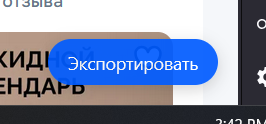
The 'Export' button added by the script

Document version: 2 • Last updated: 2025-12-10

A JavaScript user script for exporting products from a preloaded portion of the Ozon catalog to JSON and Markdown files.

The script adds an "Export" button in the bottom right corner of the Ozon catalog page. Clicking it exports all currently loaded products on the page, which are then downloaded as JSON and Markdown files. In both files, each product includes its name, price, link, rating, and number of reviews.

The script is in alpha stage and may produce errors.

Installation

  1. Install the Violentmonkey extension or a similar alternative.
  2. Open the script link from GitHub or Greasy Fork.
  3. Install the script.
  4. Refresh the Ozon catalog page if it was already open.
  5. Done!

Contributing

The project welcomes contributions via pull requests. Knowledge of GitHub, JavaScript, CSS, and HTML may be useful. If a pull request is unsatisfactory, feedback will be provided.

Financial Support

If you appreciate my work enough to send me money, you can do so via the following links:

I will be grateful for every contribution!

Document version: 2 • Last updated: 2025-12-10