Google Search Sidebar

A user script and user style to move Google search tools to sidebar.

As of 2024-08-05. See the latest version.

You will need to install an extension such as Tampermonkey, Greasemonkey or Violentmonkey to install this script.

You will need to install an extension such as Tampermonkey to install this script.

You will need to install an extension such as Tampermonkey or Violentmonkey to install this script.

You will need to install an extension such as Tampermonkey or Userscripts to install this script.

You will need to install an extension such as Tampermonkey to install this script.

You will need to install a user script manager extension to install this script.

(I already have a user script manager, let me install it!)

You will need to install an extension such as Stylus to install this style.

You will need to install an extension such as Stylus to install this style.

You will need to install an extension such as Stylus to install this style.

You will need to install a user style manager extension to install this style.

You will need to install a user style manager extension to install this style.

You will need to install a user style manager extension to install this style.

(I already have a user style manager, let me install it!)

Author
mnghsn
Ratings
0 0 0
Version
0.4.3
Created
2017-09-16
Updated
2024-08-05
Size
5.67 KB
Compatibility
Compatible with Firefox Compatible with Chrome Compatible with Opera Compatible with Edge
License
MIT
Applies to

Google Search Sidebar

A user script and user style to move Google search tools to sidebar.
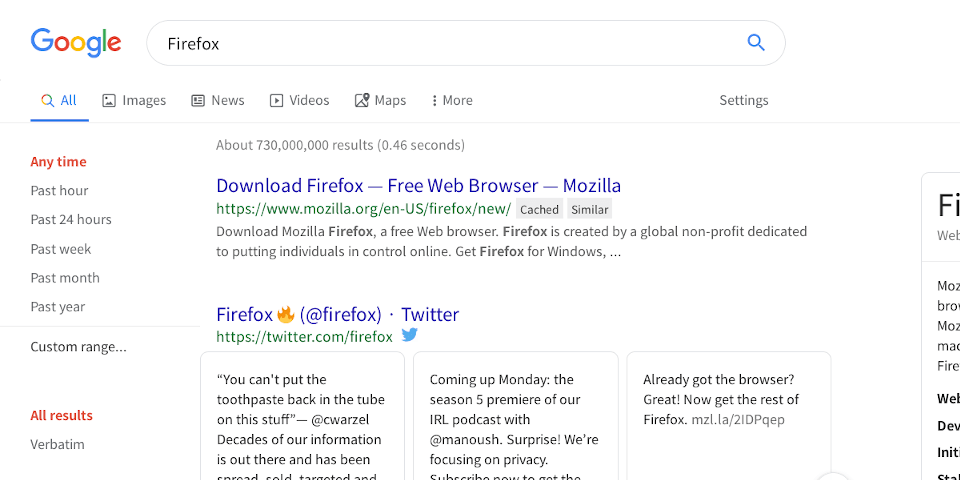
Screenshot

Google Search Sidebar

Installation

User Script

Install a user script manager such as Greasemonkey or Tampermonkey to your browser, then install this user script:

User Style

Install a user style manager such as Stylish to your browser, then install this user style:

Known Issues

  • Not working in Google Image Search due to the CSS limitation (#25).

Changelog

  • v0.4.3 (2024-08-05)
    • Fix issue caused by dynamic div ids in Google Search. (#60)
    • Hide search time on sidebar. (#58)
  • v0.4.2 (2023-04-09)
    • Fix broken layout if search result has heading.
  • v0.4.1 (2023-04-06)
    • Fix drop-down menu.
    • Keep the information block on the right side.
  • v0.4.0 (2022-07-06)
    • Update URL matching rules.
    • Update metadata.
    • Flag as compatible with Microsoft Edge on Greasy Fork.
  • v0.3.10 (2022-05-21)
    • Update the CSS to match the latest Google Search.
    • Fix the action menu styles.
    • Clean legacy codes.
  • v0.3.9 (2021-09-24)
    • Fix the new overview menu position.
    • Fix the sidebar position when the screen is small.
    • Fix the action menu colors for dark mode.
    • Fix "Clear" button position.
    • Fix userstyle meta key (@homepageURL).
  • v0.3.8 (2020-11-13)
    • Fix wrong sidebar width when Google search is opened in the background.
    • Fix carousel overlapping.
  • v0.3.7 (2020-11-11)
    • Fix CSS to match the latest Google Search layout.
  • v0.3.6 (2020-10-23)
  • v0.3.5 (2020-10-02)
    • Partially fix for the new Google design.
    • Known Issue: Not work in Google images search.
  • v0.3.4 (2019-10-11)
    • Fix Evernote Similar Search block (WebExtension).
    • Fix new image search results layout.
  • v0.3.3 (2019-06-18)
    • Fix sidebar overlapping in Google Shopping.
    • Fix Wikipedia block position.
    • Fix the new toolbar position.
    • Remove encrypted.google.com.
    • Update screenshot image.
  • v0.3.2 (2019-01-04)
    • Bump to the correct version.
  • v0.3.1 (2018-09-11)
    • Update CSS comments.
  • v0.3.0 (2017-10-27)
    • Expand the action menu ("Cached", "Similar" links next to the search result).
    • Refactor the user script.
    • Make the user script and user styles also run in encrypted.google.com.
    • Add details comments to CSS.
    • Update screenshot image.
  • v0.2.2 (2017-10-07)
    • Fix syntax error in user script.
  • v0.2.1 (2017-10-07)
    • Fix www.google.com/webhp layout.
    • Fix location search result layout.
  • v0.2.0 (2017-09-30)
    • Compatible with Greasemonkey 4 and Violentmonkey.
  • v0.1.2 (2017-09-22)
    • Improve the performance of user script.
    • Fix the image search result page overflowing.
  • v0.1.1 (2017-09-20)
    • Fix the image search result layout.
    • Fix the input field size in "Exact Size" dialog.
    • Add Greasy Fork and Userstyles.org installation links to readme.
  • v0.1.0 (2017-09-16)
    • First release.

License

Licensed under the MIT License.