Image-Search-Direct-View

Adds a "View Image" button to Image Search results. [Supported sites: Bing / DuckDuckGo / Google]

Vous devrez installer une extension telle que Tampermonkey, Greasemonkey ou Violentmonkey pour installer ce script.

Vous devrez installer une extension telle que Tampermonkey pour installer ce script.

Vous devrez installer une extension telle que Tampermonkey ou Violentmonkey pour installer ce script.

Vous devrez installer une extension telle que Tampermonkey ou Userscripts pour installer ce script.

Vous devrez installer une extension telle que Tampermonkey pour installer ce script.

Vous devrez installer une extension de gestionnaire de script utilisateur pour installer ce script.

(J'ai déjà un gestionnaire de scripts utilisateur, laissez-moi l'installer !)

Vous devrez installer une extension telle que Stylus pour installer ce style.

Vous devrez installer une extension telle que Stylus pour installer ce style.

Vous devrez installer une extension telle que Stylus pour installer ce style.

Vous devrez installer une extension du gestionnaire de style pour utilisateur pour installer ce style.

Vous devrez installer une extension du gestionnaire de style pour utilisateur pour installer ce style.

Vous devrez installer une extension du gestionnaire de style pour utilisateur pour installer ce style.

(J'ai déjà un gestionnaire de style utilisateur, laissez-moi l'installer!)

Auteur
p65536
Installations quotidiennes
4
Installations (total)
99
Notes
4 0 0
Version
1.1.1
Créé
04/01/2026
Mis à jour
08/02/2026
Taille
162 ko
Licence
MIT
S'applique à

Limitations & Disclaimer

This script uses image URLs and metadata exposed by the search engine's search results. It does not scrape external websites, so the original raw file is not guaranteed.

Search engine implementations change frequently. Breakages caused by such changes are expected behavior, not logic bugs. Since I am not a psychic, I cannot predict future changes.

Please do not treat such breakages as simple bugs or demand immediate fixes, as this kind of expectation discourages further maintenance.

If you are not comfortable with these limitations, please do not use this script.


Overview

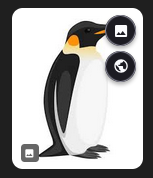
This script enhances your image search experience on following sites by adding a "View Image" button and a "Visit Page" button to search results.
  • Bing
  • DuckDuckGo
  • Google

sample

It allows you to view the high-resolution image directly in a new tab. It also includes a robust Fetch Strategy and Referrer Policy control to handle sites with anti-hotlinking protections, ensuring images load correctly where other scripts might fail.


Features

  • Multi-Site Support: Works seamlessly on supported sites.
  • Direct View: Adds a "View Image" button to open the HD image in a new tab.
  • Visit Page: Includes a "Visit Page" button to quickly navigate to the source website.
  • Advanced Fetching: Uses smart fetching strategies (Blob/Direct) to load images from sites with strict access controls.
  • Privacy Control: Configurable Referrer Policy (No Referrer, Origin, etc.) to control what data is sent to the image host.
  • Clean UI: Optional "Show on Hover" mode to keep the interface clutter-free until you need it.

Getting Started

Access the settings via your userscript manager's menu:
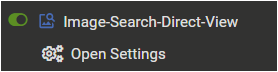
  1. Open the Tampermonkey (or equivalent) menu in your browser while on a supported search page.
  2. Select Open Settings.
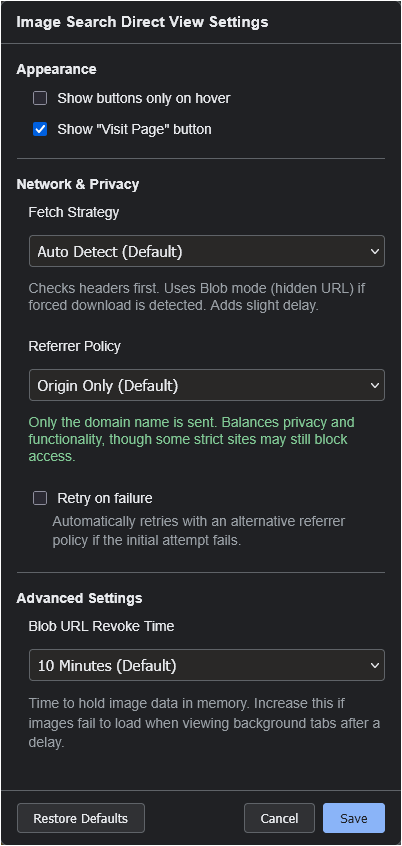
  3. Configure your preferences (Fetch Strategy, UI behavior, etc.) in the modal window.

Settings Menu

Settings Panel

Allowing External Images (XHR Security)

This script requires XHR access to external image hosting sites in order to load high-resolution images.

Method 1: Via Popup (Recommended)

When the script tries to load an external image for the first time, a permission dialog will appear. For the smoothest experience with images from various sources, select "Always allow all domains" at the bottom.
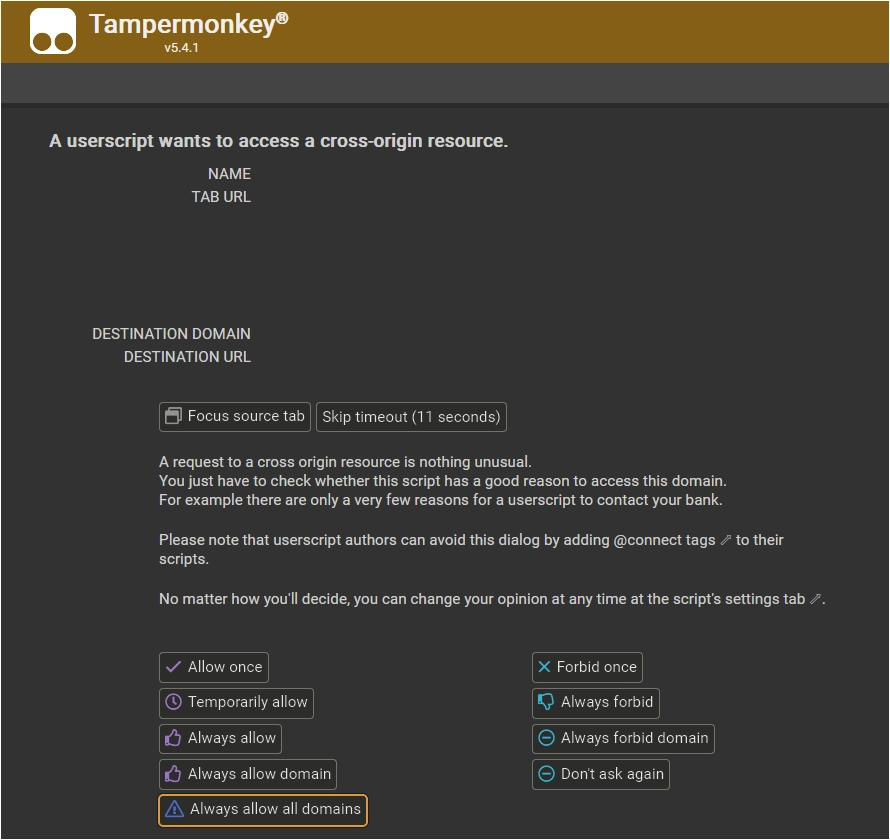
XHR Security Popup

Method 2: Manual Configuration

You can also configure this manually in the Tampermonkey dashboard. Go to the script's Settings tab, scroll to XHR Security, and add * to the User domain whitelist.

XHR Security Settings


Tested Environment

  • This script is primarily developed and tested on Firefox with Tampermonkey.
  • It is also confirmed to work on Chromium-based browsers, but testing on these platforms is less extensive.

This script is open-source and licensed under the MIT License.