Bilibili Download Pictures and Videos

Download pictures from bilibili timeline and highest-quality videos.

スクリプトをインストールするには、Tampermonkey, GreasemonkeyViolentmonkey のような拡張機能のインストールが必要です。

You will need to install an extension such as Tampermonkey to install this script.

スクリプトをインストールするには、TampermonkeyViolentmonkey のような拡張機能のインストールが必要です。

スクリプトをインストールするには、TampermonkeyUserscripts のような拡張機能のインストールが必要です。

このスクリプトをインストールするには、Tampermonkeyなどの拡張機能をインストールする必要があります。

このスクリプトをインストールするには、ユーザースクリプト管理ツールの拡張機能をインストールする必要があります。

(ユーザースクリプト管理ツールは設定済みなのでインストール!)

Advertisement:

このスタイルをインストールするには、Stylusなどの拡張機能をインストールする必要があります。

このスタイルをインストールするには、Stylus などの拡張機能をインストールする必要があります。

このスタイルをインストールするには、Stylus tなどの拡張機能をインストールする必要があります。

このスタイルをインストールするには、ユーザースタイル管理用の拡張機能をインストールする必要があります。

このスタイルをインストールするには、ユーザースタイル管理用の拡張機能をインストールする必要があります。

このスタイルをインストールするには、ユーザースタイル管理用の拡張機能をインストールする必要があります。

(ユーザースタイル管理ツールは設定済みなのでインストール!)

Advertisement:

作者のサイトでサポートを受ける。または、このスクリプトの質問や評価の投稿はこちら通報はこちらへお寄せください
作者
owendswang
1日のインストール数
6
累計インストール数
2,197
評価
18 0 0
バージョン
1.3.0
作成日
2021/02/17
更新日
2026/05/09
大きさ
120KB
ライセンス
MIT
対象サイト

Download Pictures and Videos from Bilibili Timeline

A Tampermonkey script to download pictures from Bilibili timeline. Also able to download videos from timeline and play page. It could download Bilibili DASH video/audio streams in highest quality available and merges them into a single MP4 file entirely in the browser using ffmpeg.wasm. The filenames could be modified as you like in the settings pannel. Able to download from timeline one by one automatically.

Platform:

(Only listed those versions I tested. You could try it on other platforms by yourself.)

  • Tampermonkey (tested on v5.4.1)
  • Firefox (tested on v150.0.2 64-bit)
  • Windows 10 22H2, Windows 11 24H2 (which I tested on)

Usage:

  • If opened for the first time, the 'Settings Panel' would show up. Change the settings as you like or leave it there as default. Press 'OK' to save your settings.
    (If the 'Enable video download' setting changed, the page would reload to make it effective.)
    Screenshot
  • The button to call out the settings panel and the button to auto download from current timeline are at the top-left corner on the webpage. Screenshot
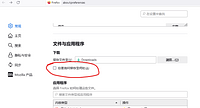
  • It's better to uncheck this settings of the web browser. Otherwise, it would keep popping up for saving location.
    Screenshot

Screenshot:

Screenshot
Screenshot
Screenshot

Special Thanks:

SocialSisterYi/bilibili-API-collect

Third-Party Licenses

This project uses the following third-party libraries:

ffmpeg.wasm

FFmpeg WebAssembly Core

The ffmpeg.wasm JavaScript wrapper is licensed under the MIT License. The FFmpeg WebAssembly core is derived from the FFmpeg C codebase and remains licensed under GPL-2.0-or-later, according to the upstream project.

This userscript does not modify FFmpeg or its WebAssembly binaries; it only loads and invokes the upstream builds in the browser.

License

This repository, as distributed as a whole, is licensed under GPL-2.0 due to the inclusion of FFmpeg WebAssembly. Unless otherwise stated, the original code authored for this project is licensed under the MIT License. Third-party components retain their respective licenses.