MyModal

原生js弹出层

As of 13.04.2023. See ბოლო ვერსია.

ეს სკრიპტი არ უნდა იყოს პირდაპირ დაინსტალირებული. ეს ბიბლიოთეკაა, სხვა სკრიპტებისთვის უნდა ჩართეთ მეტა-დირექტივაში // @require https://updategf.qytechs.cn/scripts/463930/1175342/MyModal.js.

You will need to install an extension such as Tampermonkey, Greasemonkey or Violentmonkey to install this script.

You will need to install an extension such as Tampermonkey to install this script.

You will need to install an extension such as Tampermonkey or Violentmonkey to install this script.

You will need to install an extension such as Tampermonkey or Userscripts to install this script.

You will need to install an extension such as Tampermonkey to install this script.

You will need to install a user script manager extension to install this script.

(I already have a user script manager, let me install it!)

You will need to install an extension such as Stylus to install this style.

You will need to install an extension such as Stylus to install this style.

You will need to install an extension such as Stylus to install this style.

You will need to install a user style manager extension to install this style.

You will need to install a user style manager extension to install this style.

You will need to install a user style manager extension to install this style.

(I already have a user style manager, let me install it!)

ავტორი
wish king
ვერსია
0.0.1.20230413181433
შექმნილია
13.04.2023
განახლებულია
13.04.2023
Size
6,78 KB
ლიცენზია
პ/გ

简单js弹出层

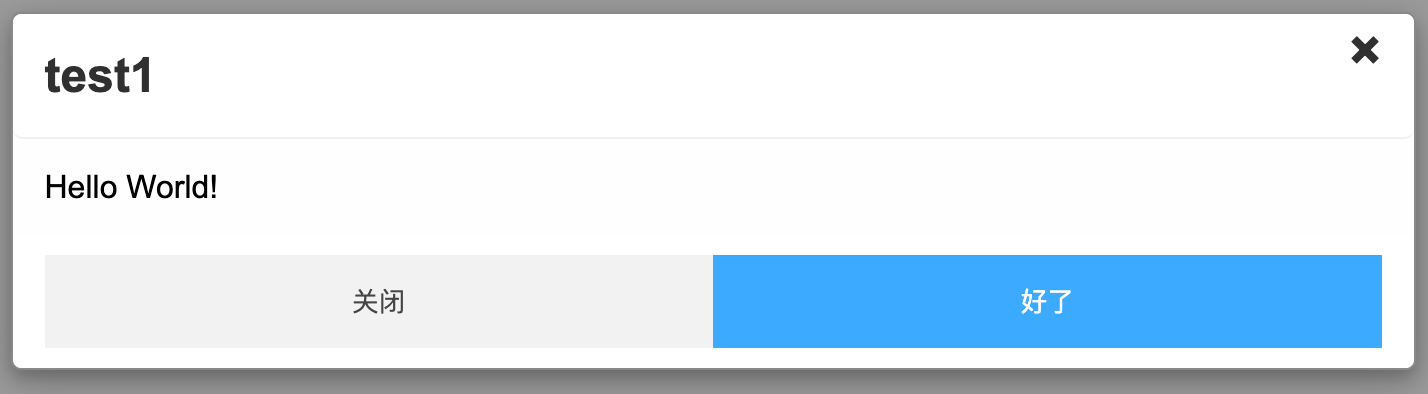
截图:
https://cdn.learnku.com/uploads/images/202304/14/5676/JHOK4DFlwZ.png!large

https://cdn.learnku.com/uploads/images/202304/14/5676/HwJ3H0S1AQ.png!large

在线预览:
https://jsrun.net/gddKp/embedded/all/light

使用示例:

new MyModal({
    width: '50%',
    height: 'auto',
    borderRadius: '5px',
    zIndex: 1010,
    //null,不显示title
    title: 'test1',
    //支持HTML格式,null不显示content
    content: 'Hello World!',
    //closeText:null,不显示关闭按钮
    closeText: '关闭',
    //okText:null,不显示ok按钮
    okText: '好了',
    //closeFn和okFn可以省略
    closeFn: function (e) {
      console.log('closeFn clicked');
      e.myModal.close();
    },
    okFn: function (e) {
      console.log('okFn clicked');
      e.myModal.close();
    }
}).show();