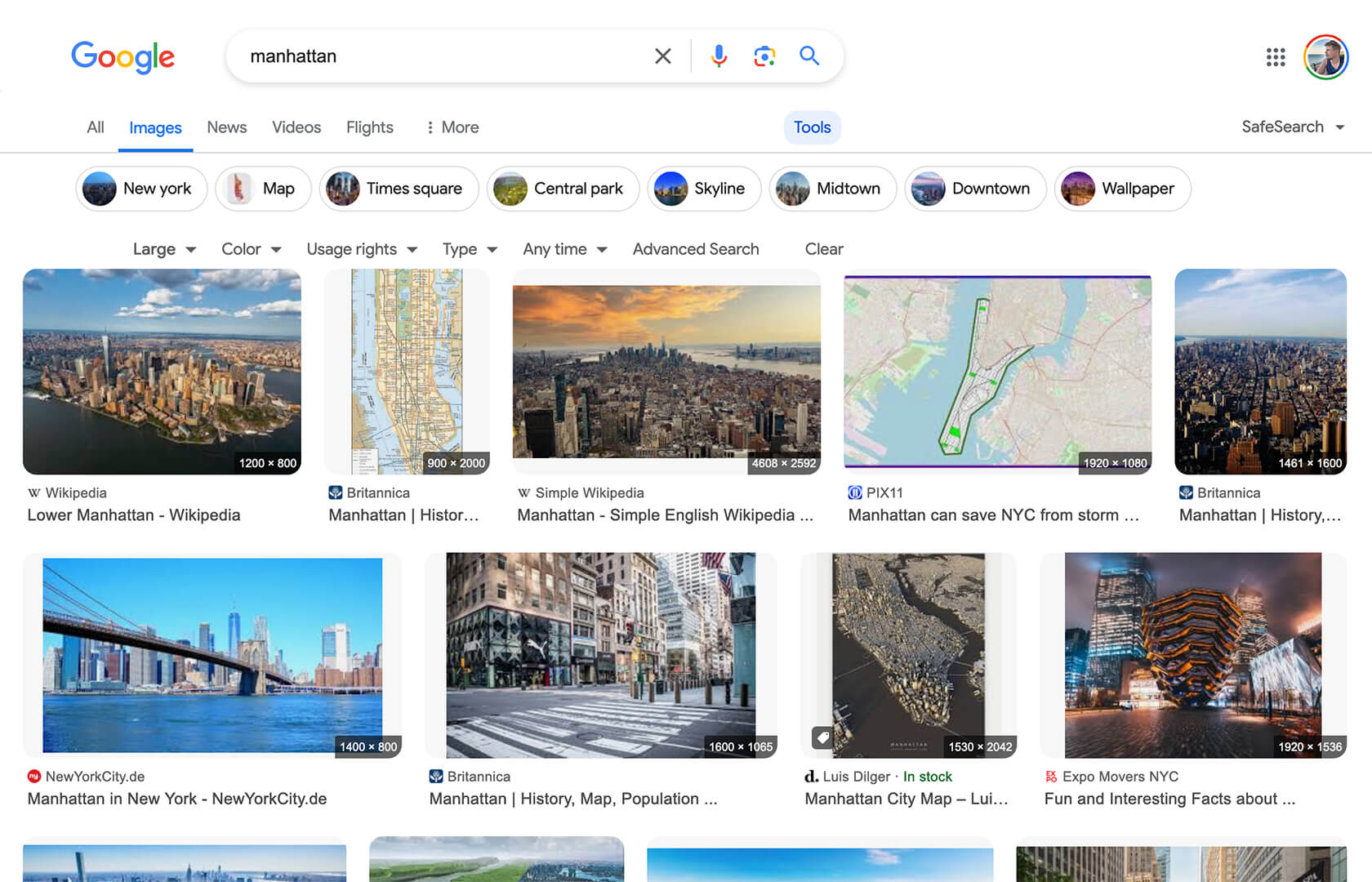
Google Image Search - Show Image Dimensions

Displays image dimensions (eg. "1920 × 1080") for each thumbnail on the Google Image Search results page.


您需要先安装一款用户脚本管理器扩展,例如 Tampermonkey 篡改猴Greasemonkey 油猴子Violentmonkey 暴力猴,才能安装此脚本。

您需要先安装一款用户脚本管理器扩展,例如 Tampermonkey 篡改猴,才能安装此脚本。

您需要先安装一款用户脚本管理器扩展,例如 Tampermonkey 篡改猴Violentmonkey 暴力猴,才能安装此脚本。

您需要先安装一款用户脚本管理器扩展,例如 Tampermonkey 篡改猴Userscripts ,才能安装此脚本。

您需要先安装一款用户脚本管理器扩展,例如 Tampermonkey 篡改猴,才能安装此脚本。

您需要先安装一款用户脚本管理器扩展后才能安装此脚本。

(我已经安装了用户脚本管理器,让我安装!)

您需要先安装一款用户样式管理器扩展,比如 Stylus,才能安装此样式。

您需要先安装一款用户样式管理器扩展,比如 Stylus,才能安装此样式。

您需要先安装一款用户样式管理器扩展,比如 Stylus,才能安装此样式。

您需要先安装一款用户样式管理器扩展后才能安装此样式。

您需要先安装一款用户样式管理器扩展后才能安装此样式。

您需要先安装一款用户样式管理器扩展后才能安装此样式。

(我已经安装了用户样式管理器,让我安装!)

作者
Tad Wohlrapp
日安装量
4
总安装量
10,956
评分
56 2 6
版本
1.5.0
创建于
2020-04-19
更新于
2025-12-16
大小
9.7 KB
兼容性
与 Firefox 兼容 与 Chrome 兼容 与 Opera 兼容 与 Edge 兼容
许可证
MIT
适用于

Icon

Google Image Search - Show Image Dimensions

This userscript reintroduces image dimensions on thumbnails on the Google Image Search results page.

Screenshot

Screenshot

Installation

To use userscripts you need to first install a userscript manager. They come as extensions for various browsers:

After you have installed a userscript manager, head over to greasyfork.org/scripts/401432 and click on the green "Install this script" button there.

Usage

After you have installed a userscript manager and this script, just visit the Google Image Search page (https://www.google.com/imghp) and start searching 😃