Goodreads Half-Stars and Rating Tags

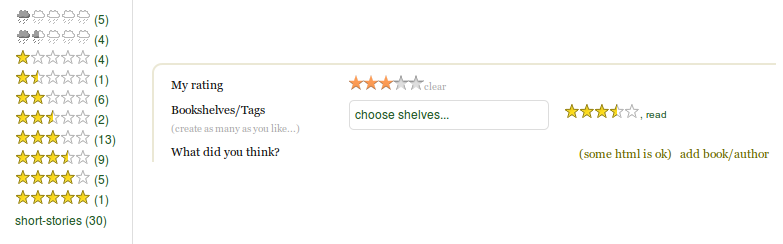
Converts selected tags on GoodReads into rating images (such as tags with half-star ratings)

คุณจะต้องติดตั้งส่วนขยาย เช่น Tampermonkey, Greasemonkey หรือ Violentmonkey เพื่อติดตั้งสคริปต์นี้

You will need to install an extension such as Tampermonkey to install this script.

คุณจะต้องติดตั้งส่วนขยาย เช่น Tampermonkey หรือ Violentmonkey เพื่อติดตั้งสคริปต์นี้

You will need to install an extension such as Tampermonkey or Userscripts to install this script.

You will need to install an extension such as Tampermonkey to install this script.

You will need to install a user script manager extension to install this script.

(I already have a user script manager, let me install it!)

You will need to install an extension such as Stylus to install this style.

You will need to install an extension such as Stylus to install this style.

You will need to install an extension such as Stylus to install this style.

You will need to install a user style manager extension to install this style.

You will need to install a user style manager extension to install this style.

You will need to install a user style manager extension to install this style.

(I already have a user style manager, let me install it!)

ผู้เขียน
goodreads-rating-tags
จำนวนติดตั้งประจำวัน
0
จำนวนติดตั้งทั้งหมด
68
คะแนน
1 0 0
เวอร์ชัน
1.0.4
สร้างเมื่อ
30-08-2014
อัปเดตเมื่อ
30-04-2016
Size
15.7 กิโลไบต์
สัญญาอนุญาต
ไม่มี
ปรับใช้กับ

Converts selected tags on GoodReads into rating images (such as tags with half-star ratings).

  • The rating scale is from 0 to 5 with increments of 0.5
  • The tag name format is as "rating-TYPE-RATING" where TYPE is "stars" or "clouds" and RATING is "0-0" through "5-0"
  • Hyphens are used instead of decimal places for half-star/cloud ratings since the period character (".") is not allowed in tags

  • Rating images are intentionally not displayed in the add-tag popup area so that it is easier to see auto-complete their text names

Examples :

  • For a 3.5 star rating, use a tag named "stars-3-5"
  • For a 5.0 cloud rating, use a tag named "clouds-5-0"
  • Or, you can prefix labels to the rating, such as "goodness-stars-3-5" or "badness-stars-3-5", etc

Tested and known to work with :

  • Firefox 31+
  • Chrome 34+

Screenshots : http://i1288.photobucket.com/albums/b486/goodreads-rating-tags/goodreads-rating-tags_zpsd64d7881.png