Export SteamDB Search

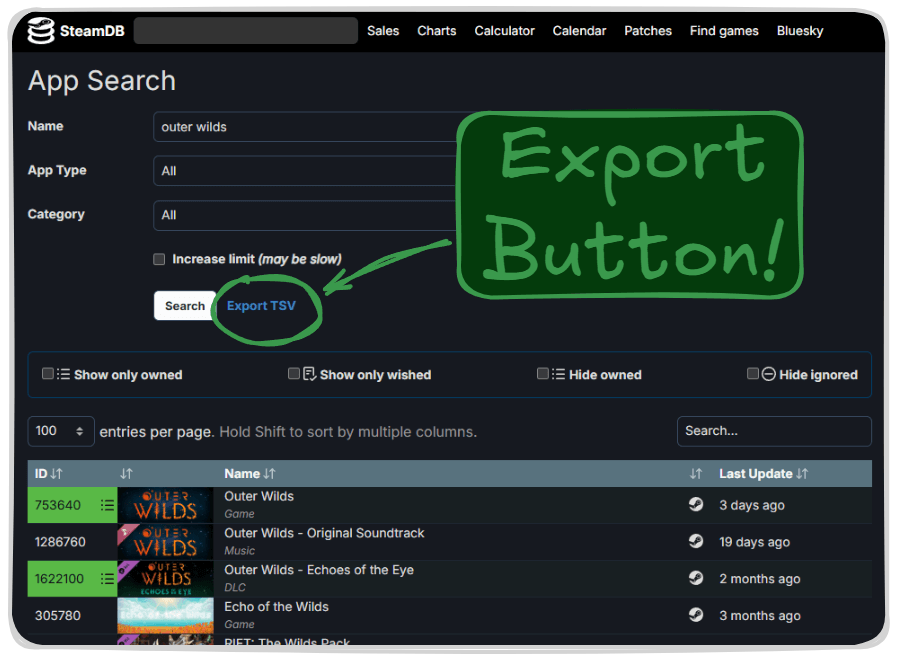
Adds a button to export current search in SteamDB as TSV

您需要先安装一款用户脚本管理器扩展,例如 Tampermonkey 篡改猴Greasemonkey 油猴子Violentmonkey 暴力猴,才能安装此脚本。

您需要先安装一款用户脚本管理器扩展,例如 Tampermonkey 篡改猴,才能安装此脚本。

您需要先安装一款用户脚本管理器扩展,例如 Tampermonkey 篡改猴Violentmonkey 暴力猴,才能安装此脚本。

您需要先安装一款用户脚本管理器扩展,例如 Tampermonkey 篡改猴Userscripts ,才能安装此脚本。

您需要先安装一款用户脚本管理器扩展,例如 Tampermonkey 篡改猴,才能安装此脚本。

您需要先安装一款用户脚本管理器扩展后才能安装此脚本。

(我已经安装了用户脚本管理器,让我安装!)

您需要先安装一款用户样式管理器扩展,比如 Stylus,才能安装此样式。

您需要先安装一款用户样式管理器扩展,比如 Stylus,才能安装此样式。

您需要先安装一款用户样式管理器扩展,比如 Stylus,才能安装此样式。

您需要先安装一款用户样式管理器扩展后才能安装此样式。

您需要先安装一款用户样式管理器扩展后才能安装此样式。

您需要先安装一款用户样式管理器扩展后才能安装此样式。

(我已经安装了用户样式管理器,让我安装!)

作者
JLCareglio
日安装量
0
总安装量
44
评分
0 0 0
版本
2.3.9
创建于
2023-08-07
更新于
2025-02-04
大小
8.3 KB
兼容性
与 Firefox 兼容 与 Chrome 兼容 与 Opera 兼容 与 Safari 兼容 与 Edge 兼容
许可证
MIT
适用于

Export SteamDB Search

This script or UserScript adds a button to export current search results in SteamDB as TSV format.


image

License: MIT Tampermonkey SteamDB

Firefox Chrome Opera Safari Edge Brave

✨ Features

  • Adds "Export TSV" button next to the search filters
  • Exports detailed information of all search results in TSV format
  • Includes:
    • App ID
    • Game name
    • Last Update (UTC)
  • Compatible with multiple browsers

🚀 Installation

  1. Install Tampermonkey or other userscript manager
  2. Click here to install the script
  3. Visit SteamDB Search to try it

💡 Usage

  1. Go to SteamDB Search page
  2. Perform your search
  3. You'll find a new "Export TSV" button in the filters section
  4. Click "Export TSV" to start the export and wait
  5. The TSV file will download automatically