YouTube-UI-Customizer

Enhances your YouTube experience. Customize the video grid layout by adjusting thumbnails per row, hide Shorts content, and automatically redirect the Shorts player to the standard video player.

您需要先安裝使用者腳本管理器擴展,如 TampermonkeyGreasemonkeyViolentmonkey 之後才能安裝該腳本。

You will need to install an extension such as Tampermonkey to install this script.

您需要先安裝使用者腳本管理器擴充功能,如 TampermonkeyViolentmonkey 後才能安裝該腳本。

您需要先安裝使用者腳本管理器擴充功能,如 TampermonkeyUserscripts 後才能安裝該腳本。

你需要先安裝一款使用者腳本管理器擴展,比如 Tampermonkey,才能安裝此腳本

您需要先安裝使用者腳本管理器擴充功能後才能安裝該腳本。

(我已經安裝了使用者腳本管理器,讓我安裝!)

你需要先安裝一款使用者樣式管理器擴展,比如 Stylus,才能安裝此樣式

你需要先安裝一款使用者樣式管理器擴展,比如 Stylus,才能安裝此樣式

你需要先安裝一款使用者樣式管理器擴展,比如 Stylus,才能安裝此樣式

你需要先安裝一款使用者樣式管理器擴展後才能安裝此樣式

你需要先安裝一款使用者樣式管理器擴展後才能安裝此樣式

你需要先安裝一款使用者樣式管理器擴展後才能安裝此樣式

(我已經安裝了使用者樣式管理器,讓我安裝!)

作者
p65536
今日安裝
2
安裝總數
43
評價
0 0 0
版本
1.3.0
建立日期
2025-08-21
更新日期
2025-12-07
尺寸
56.8 KB
授權條款
MIT
腳本執行於

Overview

Note: This script is designed specifically for the desktop YouTube site (www.youtube.com) and does not support the mobile version (m.youtube.com).

This script provides several enhancements to the YouTube user interface, giving you more control over your viewing experience. You can customize the video grid layout, hide all Shorts-related content, and automatically redirect the Shorts player to the standard video player.


📢 Important Update (v1.3.0 - 2025/12/07)

The on-screen settings button has been removed to keep the interface clean.
You can now access the settings panel directly from your userscript manager's menu (e.g., Tampermonkey menu). Please refer to the Getting Started section below for details.


Features

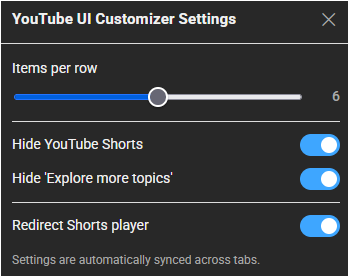
  • Customizable Grid Layout: Set the number of video thumbnails displayed per row (from 2 to 10) using a simple slider in the settings menu.
  • Comprehensive Shorts Blocker: Completely removes all Shorts content from your view, including shelves on the homepage, videos in feeds and search results, and links in the sidebar.
  • Shorts Player Redirect: Automatically redirects the vertical Shorts player to the standard, familiar video player interface for a consistent viewing experience.
  • Cross-Tab Syncing: Settings are automatically synced across all your open YouTube tabs, ensuring a seamless experience without manual updates.

Getting Started

Access the settings via your userscript manager's menu:
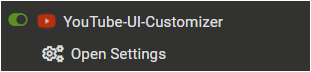
  1. Open the Tampermonkey (or equivalent) menu in your browser.
  2. Select YouTube UI Customizer Settings.
  3. Configure your preferences in the modal window.

Settings Menu

Settings Panel


Tested Environment

  • This script is primarily developed and tested on Firefox with Tampermonkey.
  • It is also confirmed to work on Chromium-based browsers, but testing on these platforms is less extensive.

This script is open-source and licensed under the MIT License.